







Breaking the hype cycle: Using the computer effectively with learners with intellectual disabilities
There has been huge growth in the use of information technology (IT) in classrooms for learners of all ages. It has been suggested that computers in the classroom encourage independent and self-paced learning, provide immediate feedback and improve self-motivation and self-confidence. Concurrently there is increasing interest related to the role of technology in educational programs for individuals with intellectual disabilities. However, although many claims are made about the benefits of computers and software packages there is limited evidence based information to support these claims. Researchers are now starting to look at the specific instructional design features that are hypothesised to facilitate education outcomes rather than the over-emphasis on graphics and sounds. Research undertaken as part of a post-school programme (Latch-On: Literacy and Technology - Hands On) at the University of Queensland investigated the use of computers by young adults with intellectual disabilities. The aims of the research reported in this paper were to address the challenges identified in the 'hype' surrounding different pieces of educational software and to develop a means of systematically analysing software for use in teaching programs.
Lloyd, J, Moni, K, and Jobling, A. (2006) Breaking the hype cycle: Using the computer effectively with learners with intellectual disabilities. Down Syndrome Research and Practice, 9(3), 68-74. doi:10.3104/practice.296
Introduction
Technology is an integrated part of our society. It plays a role in our homes and workplace as well as being an essential part of education. Children are now growing up immersed in technologies from the mobile phone to the Internet and these new technologies have changed the environment in which learning can take place. Within current educational systems, there is emerging a new generation of learners with access, needs, expectations and motivation related to technology. Teachers are both driven by the needs of their learners and by the push to integrate technology into the curriculum. For example Wepner (2004) has stated
Over the past 20 years, schools have spent millions of dollars to equip themselves with the latest technologies. Technology is indeed the most impressive development of our age, and each of us, in our own way, is captivated by it.
It is evident from a survey (Burton-Radzely, 1998) that teachers view technology as an important tool for effective literacy instruction and have especially high expectations about its efficacy for assisting learners with intellectual disabilities. Findings from this survey of over 1,000 special educators showed that 85% used technology in literacy instruction, 97% believed that technology can help learners acquire literacy skills, while 91% expected to increase their use of technology in the future.
However, research into the effectiveness of technologies for developing literacy in individuals with intellectual disabilities has not been able to keep pace with the rapid development, use and change of technologies. Specifically, research into the pedagogies around educational software has been very limited and where findings are reported, they are descriptively sketchy and anecdotal in nature. This may lead to inflated expectations for teachers using technology in the classroom. In a review on educational software, Larsen (1995) claimed that only limited information had been reported and this was in the form of reviews of software packages or anecdotal comparisons, in which poorly specified technology-based interventions were contrasted with conventional instruction. For example, in classrooms where teachers had very little experience with software the computer would be used for 'educational' games that had little to do with the overall language programme. Higgins and Raskind (1995) and Wepner (2004) have argued that the literature has overemphasised the technical concerns such as graphics and sound, to the detriment of addressing educational concerns about content, processes and opportunities for learning.
With the abundance of software on the market there are three challenges for educators. These are, first and most importantly, how to determine the quality of educational software. Second, how to evaluate and develop an awareness of the hype cycle which often surrounds these packages and to develop tools to independently evaluate software, taking into account objectives for their own learners. Third, how can educators look further than the presentation of content to consider how learners in the classroom will use the material. These are important challenges that are frequently overlooked by educators, for it is not the glossy software package that will lead to enhanced outcomes for learners, it is what is done with the software and how it is incorporated into the overall programme for learners.
When considering these three challenges for using technology in education, it may be useful to assess them in terms of Gartner's (2002) hype cycle, see Figure 1.
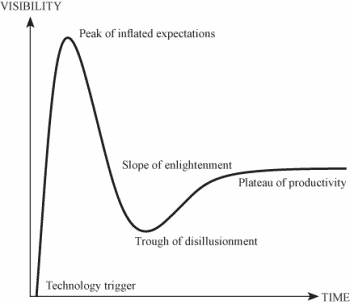
Figure 1. The Hype Cycle
Gartner described the five distinct phases of the hype cycle that may occur as new technologies emerge. The first phase is the 'Technology trigger'. This is an event, public demonstration or product launch that generates significant press and industry interest. For example schools are inundated with brochures and promotional material for new software and these materials make many claims about the value of their product.
The 'Peak of inflated expectations' follows this . This phase of the cycle is one in which during the flurry of publicised activity by technology educational consultants' over enthusiasm and unrealistic projections of results for the learner pushed the technology to its limits. The only enterprises gaining anything in this phase are conference organisers and magazine or book publishers who are making money. An example of this could be instances where individual teachers make ad hoc purchases of programs without considering links to current programs and integration into curriculum. Or where publishers highly advocate values in educational software without trialling the software with learners.
The third phase is the 'Trough of disillusionment'. Gartner described this as the point at which the technology becomes unfashionable and the press abandon the topic, because the technology did not live up to its over-inflated expectations. In the classroom this is reflected in the abandonment of software when it does not meet with teacher expectations or learner needs so it gathers dust on the school library shelves.
'Slope of enlightenment' is the fourth phase. In this phase of the cycle there is focused experimentation and solid hard work by an increasingly diverse range of organisations leading to a true understanding of the technology's applicability, risks and benefits. Commercial off-the-shelf methodologies and tools become available to ease the development process. However, moving into this phase has proved difficult for teachers, schools and systems. This highlights the need for a systematic approach to evaluating the efficacy of programs in the classroom. It is an important phase because if learning from the software is not taking place then it should be abandoned.
The final phase is the 'Plateau of productivity'. In this final phase, the real-world benefits of the technology are demonstrated and accepted. Tools and methodologies stabilise as they enter their second and third generation. The final height of the plateau varies according to whether the technology is broadly applicable or only benefits a 'niche' market. In this phase teachers and learners are using software effectively and efficiently in classrooms as components of their programs.
The aims of the research reported in this paper were to address the challenges identified in each phase of the hype cycle. The first part of the research involved developing a means of systematically analysing educational software. This was to assist educators to more effectively assess the suitability of software for classroom use to overcome challenges in phases two and three of the hype cycle. The second aim of the project was to develop, implement and evaluate teaching strategies designed to enable young adults to work independently with selected software so that the final phase of Gartner's hype cycle could be attained. This paper focuses on the first part of the study, that is the development of systems for analysing software.
Context
The context of the study was the Latch-On ™ programme at The University of Queensland in Brisbane Australia.
The Latch-On™program
Literacy and Technology Hands-On (Latch-On ™) is a post-school programme of literacy instruction for young people with intellectual disabilities (Moni and Jobling, 2000). The majority of the participants in the programme have Down syndrome. The aims of the programme are to develop learners' abilities to communicate in written, oral and visual mediums, to foster friendships via literacy and technology, and to support literacy as a desirable and valued aspect in the learners' quality of life. Learners participate in the programme for two years, attending the University two full days a week, in two 16-week semesters, each year.
Over the six years of teaching and research within Latch-On ™, the authors had observed a range of benefits for using technology as an integrated part of the literacy programme for young adults with intellectual impairment. These included motivation, which arose from the learners' desire to use the computer programs to produce creative documents, learners' abilities and willingness to interact with a variety of software and the ready access to web sites that catered to their interests e.g. in popular culture. In overviews on the benefits of computers Buckley (2000) and Black and Wood (2003) cited similar advantages and also listed a range of benefits for teachers and their learners in using technology. These include errorless learning, patient feedback, immediate feedback, self-paced learning and independence in learning. These authors concluded that the visual presentation mode of most of the software was particularly suited to the learning styles of children with Down syndrome.
However, it had become evident from Latch-On ™ experiences with educational software applications that these benefits were reduced or were not apparent depending on the quality of the software. For example, with many of the software programs designed to develop literacy skills, the content was not age appropriate or relevant for young adult learners of 18 years and over. Second, learners using commercially available programs were unable to reach the educational goals the programs espoused. It was found that such programs provided merely entertainment that led to an indiscriminate range of guessing game-type behaviours rather than the development of skills as stated by the software. Third, many programs did not promote independence, as many learners needed ongoing monitoring and teacher prompting or input to even interact with the software programs, let alone to learn anything.
In addition, research by the Latch-On ™ team (Moni and Jobling, 2002) and others (Young, Moni, Jobling and van Kraayenoord, 2004) has shown that learners with intellectual disabilities including Down syndrome have a diverse range of literacy abilities and computer skills. One size does not fit all. Consequently there can be no single strategy that can help them acquire the necessary skills for the use of software programs nor will learning occur from following a pre-determined computer software pathway. Thus it would seem for individuals with intellectual disabilities that there is no simple formula for selecting and evaluating the 'perfect software package', nevertheless there are some guidelines that could provide teachers with some directions in this respect.
From a review of the literature related to selecting and evaluating educational software (Buckley, 2000; EDUTEK, 2002) a range of characteristics and qualities of effective programs was identified and these were drawn together to develop a comprehensive list of the qualities that could guide the initial selection of education software. From this list the material was collated and developed into a set of checklists which could be used individually to assess specific aspects of software or collectively to give a clearer educational picture of the particular piece of software.
The checklists for systematically analysing software were:
1. Initial assessment
2. Program design
3. More detailed version of Checklist 2
4. Learner observations
The first checklist (see Appendix A) was an initial assessment of the system requirements, recommended age group, cost and manufacturers descriptors of the field. This was an important initial gatekeeper because should these requirements not be met by the purchaser's computer system and learners' needs then the software could be of no use.
The second checklist (see Appendix B) focused on the programme design, method of delivery, programme capabilities, instructional management and documentation. This checklist took into account the computer skills at all levels of learners in the class. For example were individual learner's skills emergent, competent or at an independent level of capability and how the programme met these needs?
A more detailed checklist was then developed to investigate the qualities in Checklist 2 in more depth (available from the first author). Finally an observation checklist (see Appendix C) was developed to evaluate the use of the computer software by a current group of learners at Latch-On ™. Areas that were observed included how the learners interacted with the software, if it was suited to their ability levels, and relevant to their interests. This observational checklist was a key component in the evaluation. As Higgins, Boone and Williams (2000) pointed out teachers may conclude that a piece of software is without significant value only to find that students enjoy and interact actively with the software. There is always the possibility that this could work in reverse in that the teacher thinks the programme is great and overestimates the learners' skills in being able to use the programme (Wepner, 2004). In this case the teacher would then need to assess what qualities of the software programme do appeal to learners and if the software meets program/educational objectives.
For the purpose of illustrating the use of these checklists in this article, the software package Phonics Alive 1 was evaluated. Within Latch-On ™ Phonics Alive 1 was one of the 'hyped' pieces of software that the team had anticipated could be used to improve the phonics skills of the learners. The pre-assessments for the programme had revealed that phonics was an area of difficulty for the learners and Phonics Alive 1 was being promoted widely in educational circles and in Queensland as a software programme that was extremely useful for improving phonics skills.
Checklist evaluation of Phonics Alive 1
All four checklists were used to evaluate Phonics Alive 1 for the learners.
The first checklist used was the initial software assessment (see Appendix A). The system requirements were matched to the hardware being used in the classroom. The manufacturer's field descriptors indicated that the programme could be included in a literacy programme. The age level stated suitability from a young age to adulthood and was considered suitable for students with learning difficulties. These descriptors corresponded to the young adult learners whose reading ages ranging from below baseline to 8 years 7 months for comprehension and below baseline to 13 years and above for word accuracy had been previously established using the Neale Analysis of Reading Ability (1999).
The second and third checklists (see Appendix B) evaluated the component parts of the software, for example the overall design of the software and how this related to the individual needs of a learner and also the group of learners in Latch-On ™. It was found that the software programme Phonics Alive 1 was simple to install and the instructions were clear and easy to follow. The directions as learners progressed through the phases were concise and clear. The graphics were colourful and enhanced the programme. There were multiple levels of mastery and results were saved and could be easily retrieved. Also the programme did not appear to crash if incorrect data was entered. A concern was that the students would need a teacher to help each time they entered the programme due to the difficulties that may be encountered as the learner self selects the point of entry into the programme.
The final checklist related to observations of the learners as they worked with the software. Using this observation checklist it was revealed that the learners made random choices of games and levels and when working with the software made chance selections and then did not follow instructions for corrections. There was no specific feedback in the programme that motivated the learner to correct incorrect responses. The software programme did not promote independence as when the learner was left to work alone the learner made random selections and continued to repeat incorrect responses. Only in a one-to-one situation could the learner be kept to the appropriate correct selection task. Unless the learner had some prior letter sound knowledge this software program did not assist them to learn it. Mostly they tended to wander up and down the strings of letters and clicking on the pictures in an arbitrary manner until by accident they made the right choice.
Conclusions
The use of these checklists with current learners in the Latch-On ™ programme facilitated the development of several principles for selecting software for this particular population. First and of prime importance is the need to conduct an analysis of the group of learners for whom the software is intended. This could include initial assessments of language, literacy and computer skills. Results for these when combined with checklists used here may ensure that learners and teachers emerge from the trough of disillusionment to climb the slope of enlightenment.
However more research is needed to investigate learners' interactions with technology. The second phase of the study was to develop, implement and evaluate teaching strategies designed to enable young adults to work independently with selected software. The data has been collected for this phase and is in the process of being analysed.
Correspondence
Jan Lloyd • The School of Education, The University of Queensland, St Lucia, Queensland, 4072 • E-mail: j.lloyd@uq.edu.au
References
- Advanced Software (1996). Phonics Alive 1 (Computer software). Sydney: Author.
- Black, B. & Wood, A. (2003). Utilising Information Communication Technology to Assist the Education of Individuals with Down Syndrome. Portsmouth, UK: The Down Syndrome Educational Trust. [Read Online]
- Buckley, F. (2000). Assisting Individuals with Down Syndrome to Access Information Technology - An Overview. Portsmouth, UK: Down Syndrome Education International.
- Burton-Radzley, L. (Ed). (1998). A National Perspective on Special Educators' Use of Technology to Promote Literacy: Technical Report. Washington, DC: MACRO International and the Council for Exceptional Children
- Edutek (2002). Software Assessment. Available on-line: https://www.edutek.net/biol1106/EDUSOFT-Appendix.html [Accessed: 2004, June 17.]
- Gartner, Inc. (2002). The Hype Cycle. Available on-line: https://www3.gartner.com/1_researchanalysis/focus_areas/trends/ett052802/ett052802.html [Accessed: 2004, June 17.]
- Higgins, E. & Raskind, M. (1995). Compensatory effectiveness of speech recognition on the written composition performance of post secondary students with learning disabilities. Learning Disability Quarterly, 18, 159-174.
- Higgins, K., Boone, R. & Williams, D. (2000). A framework for the evaluation of educational software for use in special education. Intervention in School and Clinic, 36(2), 109-115.
- Larsen, S. (1995). What is quality in the use of technology for children with learning disabilities? Learning Disability Quarterly, 18, 118-130.
- Moni, K.B. & Jobling, M. (2000). Latch-On: A programme to develop literacy in young adults with Down syndrome. Journal of Adolescent and Adult Literacy, 44, 40-49.
- Neale, M.D. (1999). Neale Analysis of Reading Ability - 3 rd edition. Australia: Australian Council for Educational Research.
- Wepner, S.B. (2004). Technology run amok: the top ten technoblunders. Reading Online, 7(6) May/June. Available on-line: https://www.readingonline.org/electronic/elec_index.asp?HREF=wepner2/index.html [Accessed: 2004, June 17.]
- Young, L., Moni, K.B., Jobling, A. & van Kraayenoord, C.E. (2004). Literacy skills of adults with intellectual disabilities in two community-based day programs. International Journal of Disability, Development and Education, 51(1), 83-97.
Appendix A
Initial Software Assessment
Title of program:
Assessor
Publisher:
Cost:
System requirements:
Storage medium:
Requires memory
Subject:
Manufacturer's descriptors of field:
Suggested classroom applications:
Age or grade level requirements:
Licensing information:
Appendix B
Checklist to evaluate programme design
| Program: Assessor: Date: | ||
| Criteria | Qualities | Comments |
| Installation |
| |
| Mechanics |
| |
| Method of delivery |
| |
| Program design |
| |
| Graphics sound and colour |
| |
| Program capabilities |
| |
| Instructional management |
|
Appendix C
Observation of Learner Using Software
Learner's Name Date
Observer Software
| Observe | Independently | With assistance | Comments |
| Engagement
Interaction & Navigation
Learning
|